
Work
Real work for real clients
Three projects in depth: an online store, a catalog site and our own app. We only show client work with the client’s permission.

Online store
 Twins Subli
A store rebuilt to sell from the phone, at retail and wholesale prices.
- Sector
- Sublimation printing and custom gifts
- The challenge
- The old store showed a blank first screen until the server answered, listed a single price per product and had no add-to-cart button on the cards. Adding photos meant pasting links.
- What we built
- A new mobile-first store with retail and wholesale prices on every product (in euros, at the client’s request), a cart and orders over WhatsApp. Plus an admin panel to add products and photos from a phone and log sales.
- The result
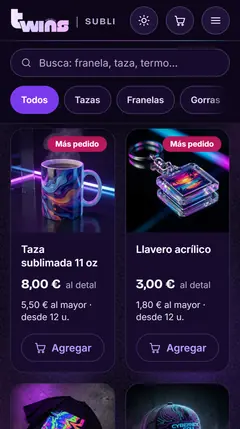
- The catalog shows up right away, and every card says what it costs and how to order. The same seven photos went from 5.2 MB to 380 kB.
Before and after: Twins Subli


1 · Wholesale pricing is flagged on the very first screen.
2 · Two clear paths: browse the catalog or message on WhatsApp.
3 · The home page arrives fully rendered from the server, so the content appears right away.
Move the slider or use the buttons.
After
- Wholesale pricing is flagged on the very first screen.
- Two clear paths: browse the catalog or message on WhatsApp.
- The home page arrives fully rendered from the server, so the content appears right away.
Before
- A headline that swapped one word every few seconds.
- Not a word about prices on the first screen.
- The first screen stayed blank until the server answered.
In the catalog, every card now shows retail and wholesale prices, in euros at the client’s request (before: a single price in dollars), each with its own “Add” button. The same seven photos went from 5.2 MB to 380 kB.
Screenshots of the store’s home page on a 375 px-wide phone.
Log
- Before: a headline that kept changing and no price in sight.
- After: wholesale pricing up front and WhatsApp ordering one tap away.
- Want this for your business? Get a free quote →
Each step shows up here.
This part didn’t load.
More on websites and online stores →More on sales dashboards →
Catalog site
Security camera and backup power store
A site that helps customers choose technical gear before they message the store.
- Sector
- Security cameras, backup power and printing
- Client
- Client name withheld for confidentiality
- The challenge
- Selling technical gear online: before reaching out, customers need to know which camera fits or which inverter can keep their devices running.
- What we built
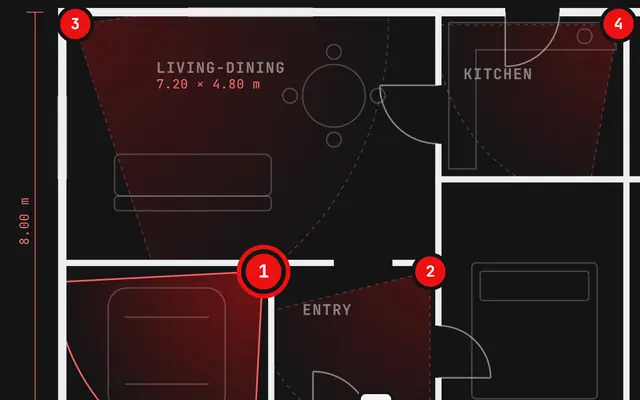
- A catalog site with an interactive floor plan that shows what each camera covers, and a step-by-step guide that builds the backup-power request (which devices and for how long) and sends it to the store’s WhatsApp. It also has a tabbed catalog (energy, printing and security) and an installation section.
- The result
- Every backup-power request reaches the store’s WhatsApp already saying what the customer wants to keep running and for how long, so the store can recommend the right inverter and batteries in the first reply.
Our own product
Axynology app
The app we sell is the app we run, every day.
- Sector
- Chat sales
- The challenge
- Letting a business handle Instagram and its website chat in one place, and sending the price by DM automatically when someone asks in a comment.
- What we built
- We combined our inbox with the comment bot and the product catalog. We set it up on our own server and run it every day.
- The result
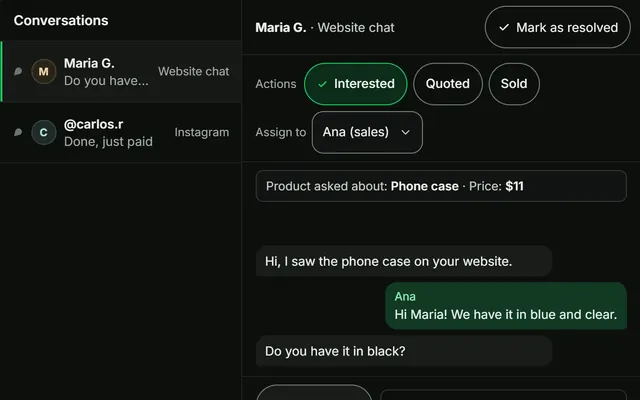
- Only people who reply to the DM reach the inbox, with the product and price in view, and the business’s team tags, assigns and replies to each conversation from the same place.
App tour
Conversations
Products
Stats
Here’s what the app looks like, with sample data.
Is the next project yours?
Tell us what you sell and how you sell it today. We’ll tell you in writing what we’d do first.
or email us at hello@axynology.com